How I Actually Use Claude and Codex CLI Agents Every Day
Table of Contents
I built two products, ship daily, do client work, and run no team. Here is the actual stack.
June 15, 2026
Let me be honest about something before we start.
Most "my AI workflow" posts are written by people who tried a tool for a week and then described it in four bullet points. You read them, feel vaguely inspired, try the same thing, and nothing sticks because the post left out everything that actually matters — the order things happened, what broke, why one tool works and another doesn't, and how the whole thing actually fits together when your to-do list is three people's worth of work.
This is not that post.
I am a solo developer. I currently have two products in active development — IndieMarketer and JobClaw. I also do client and company work on the side. I built TestGen, an open-source agent-native test generation layer for Codex and Claude Code. I write, I ship, I answer my own support emails.
There is no team.
What there is, is a CLI stack that I have built up slowly over about eight months. It is not magic. It is a lot of small decisions that compounded. This post is my attempt to write down all of it, honestly, including which things work for what and why I reach for them.
Why the terminal became my main workspace
When I started doing serious AI-assisted development, I was living in browser tabs.
Open ChatGPT. Paste code. Copy response. Switch back. Lose context. Repeat.
The fundamental problem is that the browser is outside your codebase. Every time you go there, you are manually bridging the gap between where your work lives and where the intelligence lives. That bridging takes time, introduces errors, and means the AI is always working with a stale, partial picture.
The terminal is already where the work lives.
git, tests, the dev server, build tools, deployment — it is all there. If the AI agent is also there, the gap disappears. It can read the actual file, run the actual test, look at the actual git log. Not a paste from it. The actual thing.
That is the reason I moved. Not because CLI agents are cooler. Because they are closer.
Claude Code — the one I think with
Claude Code is my primary agent. It runs directly inside my repo and it is what I use for work that requires actual reasoning.
I do not mean "harder" prompts. I mean work where the answer is not obvious and I want something that pushes back, asks a clarifying question, or tells me my approach has a problem I have not noticed yet.
Architecture decisions. Debugging sessions where the error is two layers removed from the actual cause. Writing that needs to sound like me. Code review where I want a second opinion with reasons, not just a diff.
The other thing about Claude is that it has good taste about when to stop. When I give Codex a task, it will often try to complete it even when it is running into ambiguity. Claude is more likely to surface the ambiguity and ask. That is sometimes annoying. It is also often exactly right.
I use the /goal slash command when I want it to behave more like Codex — declare a goal, commit to it, do not stop until it is done or it hits a genuine blocker it cannot resolve.
Codex — the one I ship with
Codex CLI is faster and more direct. It takes a task, runs it, tries things, and comes back.
I think of Codex as my executor. When I have already made the decision — I know what I want, I know roughly how it should be done, I just need it done — Codex is the right tool. It has less deliberation overhead.
The pattern I use a lot is what I think of as oh-my-codex mode: I give both Claude and Codex the same problem simultaneously and then compare the results.
This sounds redundant. In practice it is one of the most useful things I do.
Two agents, same ticket. Sometimes Claude writes cleaner abstractions. Sometimes Codex finds a simpler implementation path I was not considering. Running them in parallel and then picking the better path is faster than running one and iterating.
The mental model: it is not competition. It is like having two engineers whiteboard the same problem separately and then comparing their approaches before anyone writes any code.
cmux — the browser for running multiple agents
This one I am currently trying and it is already changing how I handle parallel agent work.
cmux is a Ghostty-based macOS terminal built specifically for AI coding agents. The core idea: vertical tabs per agent session, with notifications when any agent finishes or hits a blocker.
Before cmux, running Claude and Codex in parallel meant two separate terminal windows, constant manual switching, and no clear signal about which session needed attention. You are always guessing whether either agent is done or just slow.
cmux solves the ambient awareness problem. Each agent gets its own tab. When something happens — a completion, an error, a prompt waiting for input — you get notified without having to watch the terminal.
The workflow I am exploring right now:
- Tab 1: Claude working a feature end-to-end
- Tab 2: Codex running the same feature in parallel (oh-my-codex mode)
- Tab 3: A background agent running TestGen on the last finished module
- Notifications tell me when any of them needs me
Instead of being the babysitter who checks on agents every two minutes, I can stay focused on one thing and get pulled in only when something actually requires a decision.
The vertical tab metaphor is exactly right for this. Browser tabs are how we already manage parallel contexts. Applying that pattern to agent sessions makes the multi-agent workflow feel natural instead of chaotic.
Still early days with it. But the ambient notification model alone is worth the switch from juggling plain terminal windows.
gh CLI — GitHub without the browser
I never open the GitHub UI anymore.
gh — the official GitHub CLI — handles everything I used to do in the browser:
gh pr create --title "feat: add user auth" --body "closes #42"
gh pr list --state open
gh run watch   # watch CI live in terminal
gh issue create --title "bug: date parsing breaks UTC"
gh repo clone prince/my-project
The reason this matters beyond convenience: the agent can call gh directly.
When I ask Claude to "create a PR for the current branch with a proper description based on the changes", it can actually do it. It reads the diff, writes a description that includes context about what changed and why, and runs gh pr create. No copy-paste required from me.
Same for company work. When I am working in a client's repo and they use GitHub, the agent can look at open issues with gh issue list, pull the relevant one into context, and start working with the actual acceptance criteria rather than my memory of what the ticket said.
The other thing gh unlocks is status visibility. gh run list in a loop during a deploy tells me if CI is green without me switching windows. gh pr view --comments shows me review feedback without leaving the terminal. It sounds small. Over a day it adds up.
Vercel CLI — deployments from the terminal
I run JobClaw and IndieMarketer on Vercel. Both are Next.js apps.
The vercel CLI is how I stay close to the deployment layer without ever opening the Vercel dashboard:
vercel --prod          # deploy to production
vercel logs            # stream production logs
vercel env pull        # sync env vars locally
vercel inspect         # check deployment metadata
The integration with the agent happens during debugging. If something breaks in production, I can ask Claude to pull recent logs with vercel logs, correlate them against the last commit diff from gh, and form a theory about what went wrong. That whole loop — logs, code diff, hypothesis, fix — happens in the terminal without switching windows once.
For solo shipping, every unnecessary context switch is a tax. The Vercel CLI is one of the tools that eliminates an entire category of that tax.
Supabase CLI — the database in the terminal
Both my products use Supabase as the backend. The supabase CLI runs the full local development stack:
supabase start              # local postgres + auth + storage
supabase db diff            # check schema drift against remote
supabase gen types typescript --local  # regenerate TypeScript types
supabase db push            # apply local migrations to remote
supabase functions deploy   # deploy edge functions
The TypeScript type generation is the part that helps the agent the most. When types are current, Claude and Codex write correct Supabase queries on the first attempt because they can read the actual shape of every table. Without it, they guess and then I have to correct them.
I run supabase gen types as part of my pre-commit hook so types are always fresh. The agent automatically benefits without me thinking about it.
gh CLI + CodeGraph — the codebase navigation layer
CodeGraph indexes the entire repo as a semantic graph — symbols, callers, call paths, module dependencies.
When I ask "what depends on this function" or "trace everything that calls this auth middleware", CodeGraph does a graph traversal and returns exactly what I need. Not a file search with 30 results I have to read through. A graph query with a focused answer.
For both personal projects and company work, this changes how the agent handles unfamiliar parts of a codebase. Instead of burning context reading file after file, it sends a focused query and gets a specific answer.
For personal projects: I use it most when I am refactoring. Before touching any module, the agent runs a CodeGraph query to understand what else will break. It has saved me from breaking things I did not know were connected more times than I can count.
For company/client work: I land in codebases I did not write and I need to get productive fast. CodeGraph makes that dramatically faster. The agent can understand the structure of a codebase I have never seen in a fraction of the time.
Combined with gh for issue and PR context, the two tools together mean the agent starts every task with the actual code structure AND the actual ticket requirements. Not my paraphrased version of either.
Figma MCP — design review for one person
I have no designer.
When you are solo and you care about UI quality, you have two options: spend the time doing design review yourself (which means you are not building), or find a way to systematize the review.
The Figma MCP connects the agent directly to my Figma workspace. When I finish a UI page or component, I run a design review pass. The agent:
- compares the rendered component against the Figma spec
- checks spacing consistency using the design system tokens
- flags places where I used a hardcoded value instead of a token
- catches responsive issues against the breakpoints defined in the design file
- notes places where I used the wrong component variant
This is exactly the kind of feedback a designer would give in a review. I do not get that from a designer because I am working alone. Running it as an agent-powered check catches drift before it accumulates.
For client/company work: When the company has an existing Figma design system, I plug the Figma MCP into that workspace instead of mine. The agent then enforces the client's design tokens and component library automatically. It is a much faster way to stay compliant with someone else's design system than reading their spec doc manually.
The honest version: design review without the Figma MCP is something I was constantly skipping because I was always in a hurry to get to the next feature. The MCP made it zero-cost enough that I actually do it now.
Jira MCP — for when you are doing someone else's work
My personal projects do not use Jira. Companies do.
When I am doing client work or team engagement and the team is on Jira, I run the Jira MCP:
# What it gives the agent:
- Read current sprint board
- Pull ticket details and acceptance criteria
- Update ticket status after task completion
- Link commits and PRs back to tickets
The difference this makes is significant in a way that is easy to underestimate until you have used it.
Without Jira MCP: I read the ticket in the browser, keep the relevant context in my head, start coding. As the session goes on, my mental picture of the ticket drifts. I finish something and it is 80% right.
With Jira MCP: the agent reads the full ticket including the acceptance criteria and any discussion in the comments. It holds that context for the entire session. When I am done, it checks what was done against what was asked for and surfaces any gaps before I submit the PR.
That last step — checking completion against requirements — is the part I was always too rushed to do carefully. The agent doing it automatically has caught issues that would have become review comments or reverts.
Context7 — because training data lies
The way most AI agents answer library questions is: they remember what the library API looked like during training, and they give you that.
The problem is that training data has a cutoff. Next.js, Prisma, Supabase, React — these things change. The API you get from the agent's memory might be from a version you are not running. The configuration options might have changed. The method signature might have been deprecated.
Context7 fixes this by letting the agent pull current, version-accurate documentation on demand:
npx ctx7@latest library "Next.js" "how does app router caching work in 15"
npx ctx7@latest docs /vercel/next.js "server actions with forms and Zod"
npx ctx7@latest docs /supabase/supabase "realtime with RLS enabled"
I have a find-docs skill that triggers this automatically whenever a library question comes up during a session. The agent reaches for current docs instead of guessing from memory. The output quality goes up noticeably.
The tax I paid before Context7: I was constantly catching small library errors in generated code. Wrong prop names. Deprecated methods. Configuration options that no longer existed. Context7 eliminated most of that category of error.
TestGen — the test coverage layer I built myself
TestGen is something I built. It is an open-source, agent-native test generation layer for Codex, Claude Code, and any other coding agent.
I built it because I was noticing a pattern: solo development and good test coverage are in tension. When you are moving fast and you are the only one, tests are what you skip. And then three weeks later you are afraid to refactor anything because you do not know what will break.
The standard advice is why TDD matters even when you are shipping solo. Write tests first. That is good advice. It is also advice I do not follow when I am shipping solo at speed. Honest.
TestGen is built for how solo development actually works:
testgen doctor          # check repo readiness, frameworks, provider keys
testgen capabilities    # machine-readable list of what it can do
testgen analyze ./src   # scope and estimated cost before generation
testgen generate ./src --dry-run --emit-patch --output-format json
# review the patch first
testgen generate ./src --write  # write only after you approve
The flow is: analyze first, patch second, write last.
The agent proposes what tests it wants to generate and shows you a structured patch. You review. You approve. Only then does it write anything. No silent file creation, no tests that pass because they test nothing.
It detects your testing framework automatically — Jest, Vitest, pytest, Go testing, testify — and generates tests that match the style of your existing test files. It reads nearby tests and uses them as context for fixtures, mocking patterns, and assertion style.
The integration that matters: I have TestGen wired into a /testgen slash command in both Claude and Codex. After I finish a feature, the slash command runs the full TestGen flow and shows me coverage added without me having to think about it. The test step became automatic instead of something I had to remember to do.
The thing I was most proud of when I built it: the MCP server mode. You can expose TestGen as an MCP tool, which means any agent that supports tool calls can use it directly. You tell Cursor or Continue "use TestGen on this folder" and it just works.
IndieMarketer — what I am building with all of this
IndieMarketer is in private beta right now.
The problem it solves: marketing for solo founders is a full-time job. If you are also building the product, doing support, and handling everything else, marketing is what gets dropped. You ship something good and nobody finds out.
IndieMarketer is six AI agents that handle the marketing layer while you focus on the product:
- Scout — finds relevant subreddits, Twitter communities, HN threads, and competitor launches using the Exa API, Twitter Search, Reddit API. It surfaces opportunities you should be engaging with.
- Writer — creates content in your voice, adapted per platform. Twitter thread, Reddit comment, LinkedIn post — the same idea shaped appropriately for each place.
- Publisher — queues and schedules across Twitter/X, Reddit, LinkedIn, HN, and Email. One command covers all of them.
- Engage — reads replies and comments and responds in your voice, with human review before anything goes out.
- Analyst — tracks what is working. Which posts are driving traffic, which communities are responding, what is worth doing more of.
I am building this because I needed it myself. When I shipped JobClaw, I was manually doing everything the Scout and Publisher agents now do. It was exhausting and I was bad at it. I kept forgetting to post. I kept missing relevant threads. The consistency was awful.
The whole stack I have described in this post — Claude, Codex, gh CLI, Vercel CLI, Supabase CLI, Figma MCP, Context7, TestGen — is exactly what I am using to build IndieMarketer. The irony of using an AI-assisted solo dev workflow to build an AI marketing tool for solo devs is not lost on me.
gstack — product thinking without a co-founder
gstack is a structured way to do the product conversations you would normally have with a co-founder.
The problem with solo building is that the decisions that matter most — what to build, what to cut, what assumption are you encoding in this feature — are exactly the decisions that benefit from another person asking dumb questions.
When you are alone, you skip these conversations. Not because you are arrogant. Because there is nobody to have them with.
gstack gives me a framework for that conversation with myself. Before I start any significant feature on IndieMarketer or JobClaw, I run through:
- Who exactly is this for, and is that the same person who will pay
- What does the user feel before this feature exists versus after
- What is the simplest version that actually tests the assumption
- What am I building that I cannot undo easily
- Does this decision compound positively or does it just add complexity
The last one is the hardest. When you are moving fast, everything feels like forward momentum. gstack is the thing that makes me stop and ask whether I am actually moving the product forward or just keeping myself busy.
The compound engineer skill — before you write a line
This is a custom skill I built that lives in both my Claude and Codex setups.
When I activate it, the agent shifts into what I think of as engineering framing mode. Before we write anything, it walks through:
- Is this the right abstraction, or are we building tech debt that will charge us interest for months
- What is the failure mode of this approach at scale — not production scale necessarily, but real-user scale
- What assumptions are we encoding in this data model or API contract
- Does this decision close future options or keep them open
I use this skill before any system design work, any new API contract, any database schema change, and any piece of infrastructure I know I will live with for a long time.
The name is intentional. Good engineering decisions compound. A good abstraction now means you do not have to rewrite in three months. A bad one means every feature you add on top of it is harder than the last. The skill is a forcing function for making me think about compounding before I commit.
Loop engineering — how I structure sessions
This is the workflow change that has made the biggest difference in the last six months, and it has almost nothing to do with the tools.
I used to just sit down and work. Open the laptop, look at the backlog, pick something that felt important, start. No declared structure to the session. Just work until I got tired.
The problem: I would finish a three-hour session and not know if I had moved the project forward or just moved around inside it. I had no way to measure whether the session was good.
Loop engineering is a simple discipline:
1. Declare the session goal. One sentence. What does done look like today? Not a list. One thing that, if finished, makes today a success.
2. Run the loop. Agent works toward the goal. It checks in at meaningful steps — not micromanagement, just "here is what I did, here is what is left, here is any blocker."
3. Close the loop. At the end: did we hit the goal? What is the honest status? What carries into tomorrow?
The /goal slash command in Claude is built exactly for this. You declare the goal, it commits, it does not stop until the goal is met or it surfaces a blocker it cannot resolve alone.
I use this for personal projects only. Company work already has its own structure through sprints and Jira. Loop engineering is the structure I built for myself to replace the accountability that a team would normally provide.
It sounds simple. It changed how useful my sessions feel.
The skill layer — lazy context that loads when needed
Skills are the thing most people who set up these agents skip, and it is a real mistake.
A skill is a folder of instructions and references that lives in your repo and loads only when the current task matches it. The agent does not carry all of it all the time. It is lazy loading for context.
The reason this matters: heavy context makes agents less precise. When I was putting everything in one giant system prompt, I was getting worse results on specific tasks because the relevant instructions were diluted by everything else. Skills fixed that.
My current skill set:
- find-docs — triggers Context7 automatically when a library question comes up. Zero-friction access to current docs.
- compound-engineer — engineering framing mode. Activate before any system design decision.
- design-review — loads Figma MCP context and runs a structured UI review pass against my design tokens.
- testgen — invokes TestGen after feature completion, shows coverage added, flags gaps.
- loop-engineering — tracks the session goal, reports progress at key steps, closes the loop at the end.
None of these are complex. Each one is a markdown file with instructions and some context references. Together they make the agent behave significantly better for specific categories of work without polluting the context when that work is not happening.
Slash commands — the things I do without thinking
Slash commands are saved intent. They are not shortcuts. A shortcut implies the full version is available. A saved intent means I have already decided how I want this class of task to work, encoded it once, and I do not have to think about it again.
The ones I use most:
/goal— commit to a session goal and run until done or blocked/review— full design review pass against Figma spec/commit— generate a proper commit message from staged changes, including context about why not just what/testgen— run the TestGen flow on recently touched files, show coverage delta/blog— scaffold a new blog post in the exact MDX format my repo expects, with frontmatter done correctly/pr— create a PR viagh cli, write the description, link the Jira ticket if applicable/schedule— set a one-shot or recurring check-in for something long-running that I want to revisit
The /commit one is worth dwelling on for a second. Commit messages are something I was always doing badly under time pressure. "fix things", "update stuff", "wip". The slash command generates a proper message that explains what changed and why, based on the actual diff and the session context. My commit history became genuinely useful documentation instead of a joke.
What all of this actually did
I want to be honest about what changed and what did not.
I did not get 10x faster. I do not think that number is real for most people. What I got was:
Less context loss. Each tool that removes a window-switch keeps me in the flow of the current task. Accumulate enough of them and a session feels qualitatively different. I end it remembering what I was doing.
Fewer blank-page starts. Slash commands and skills mean I start from a consistent position instead of from nothing. The /blog command means writing this post started with the right structure already in place, not me staring at an empty file deciding how to format the frontmatter.
Boring parts handled. Commit messages, PR descriptions, test generation, design review — these were all things I was doing badly or skipping. They now happen consistently and correctly. For the automation layer that runs outside active sessions, see how I automated PR review and job outreach with OpenClaw.
Design quality that does not degrade. Without the Figma MCP and the design-review skill, UI quality on solo projects drifts. There is nobody to catch the drift. Now the drift gets caught automatically.
Knowing where sessions end. Loop engineering is the thing that made my work feel less like a blur. I end each session with a clear record of what happened. The next session starts from that record, not from trying to reconstruct where I was.
The speed is real but it is not the main thing. The main thing is that solo building feels less like fighting entropy all the time.
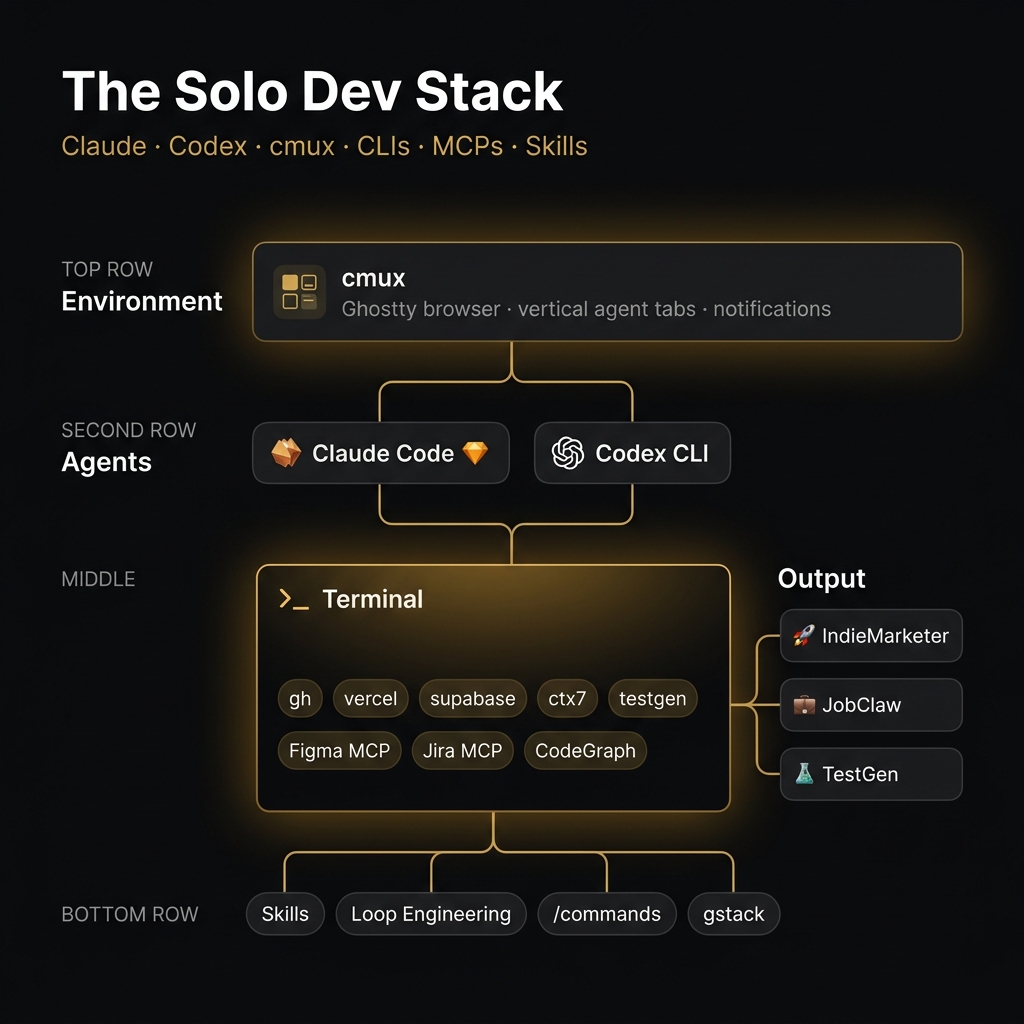
The full stack
Everything in one place:
Environment
- cmux — Ghostty-based terminal browser for running multiple agents, vertical tabs + notifications (github.com/manaflow-ai/cmux)
Agents
- Claude Code — reasoning, design decisions, anything that needs judgment
- Codex (oh-my-codex mode) — execution, parallel attempts, fast iteration
CLIs — both personal and company/client work
gh— GitHub in the terminal, PRs, issues, CI statusvercel— deployments, logs, preview URLs, env varssupabase— schema management, type generation, edge functionsctx7— current library docs on demand via Context7testgen— review-first test generation (testgen-cli.vercel.app)
MCP Servers
- CodeGraph — semantic codebase graph, for both personal and company repos
- Figma MCP — design review on personal design system, client design system for company work
- Jira MCP — ticket context and status updates for company/client work only
Skills — find-docs, compound-engineer, design-review, testgen, loop-engineering
Slash commands — /goal, /review, /commit, /testgen, /blog, /pr, /schedule
Frameworks for thinking
- gstack — product decisions before building (personal projects)
- Loop engineering — session structure and accountability (personal projects)
- Compound engineer skill — engineering framing before any significant design decision (both)
One last thing
I said at the start that most workflow posts leave out what actually matters.
What actually matters here is the order.
You do not set all of this up at once. I did not. I added each piece when a specific friction became painful enough that I went looking for a fix. The gh CLI when I got tired of switching to GitHub to create PRs. Context7 when I caught the third hallucinated API signature in a week. TestGen when I realized I had gotten afraid to refactor a codebase I had been building for six months because I had no tests.
The stack is not a product you buy. It is a set of decisions you make in response to your own friction.
If you are starting: pick one thing you do every day that costs you more than it should. Make it automatic. Then find the next one. That is how this compounds.
Building IndieMarketer (AI marketing agents for solo founders, private beta) and JobClaw. TestGen is open source — if you are building with Codex or Claude Code and want review-first test generation, try it.