Testing & Test-Driven Development
Table of Contents
Modern software applications are complex. As your project grows from a small script to a production-level application with thousands of features, ensuring that everything continues to work becomes increasingly difficult. This is where automated testing and especially Test-Driven Development (TDD) become essential.
In this comprehensive guide, we'll break down the concepts of automated testing, unit testing, test isolation, mocking, snapshot testing, and the TDD cycle in a simple and beginner-friendly way.
Why Application Testing Matters
As developers, we write functions, objects, classes, and APIs. Each piece of code takes input, processes it, and returns output. To ensure that our code behaves as expected, we write tests—special scripts that automatically verify outputs.
What Do Tests Do?
Tests are automated scripts that perform three key actions:
- Call your function with some input
- Compare the actual output with the expected output
- Pass the test if they match, fail if they don't
This process is called Unit Testing when you test small pieces of logic.
Why Manual Testing Fails in Real Life
Many beginners think they can just test everything manually by clicking around. But in real projects, this approach breaks down quickly.
Regression Issues
Adding new features often breaks old ones, sometimes in unexpected places. Without automated tests, you won't know what broke until users report bugs.
Manual Testing Doesn't Scale
Imagine an ecommerce platform with 5 new features and 50 existing features. Your tester must now manually test 55 flows every release. Next month it's 70 flows. After a year, you have hundreds of flows to test manually. This is simply impossible to maintain.
Human Error
Manual testers are prone to mistakes, especially under tight deadlines. They might skip steps, miss edge cases, or simply get tired after testing the same flows repeatedly.
Developers Need Confidence
When developers push code, they must be sure they didn't break anything. Manual testing provides no such guarantee until hours or days later when QA finishes their testing cycle.
Automated Testing: The Real Solution
Automated testing solves all the above problems by running tests automatically whenever code changes.
Benefits of Automated Tests
Automated tests provide numerous advantages:
- Prevent regression by catching breaking changes immediately
- Increase developer confidence when making changes
- Make the application future-proof and maintainable
- Catch bugs instantly before they reach production
- Integrate seamlessly with CI/CD pipelines like GitHub Actions or GitLab CI
- Accelerate release cycles by reducing QA bottlenecks
Before every deployment, a single command runs all test files and verifies that the application still works:
npm test
If any test fails, the deployment is automatically blocked, preventing broken code from reaching production.
Unit Testing & the 3A Pattern
Unit testing focuses on testing the smallest unit of code, usually a single function. A typical unit test follows the 3A structure which makes tests easy to read and maintain.
Arrange
Prepare input data, expected output, mocks, and any setup needed for the test.
Act
Call the function you want to test with the prepared input.
Assert
Compare the expected output with the actual output returned by the function.
Here's a simple example using Node.js:
import { strictEqual } from "assert";

// Test a simple sum function
function sum(a, b) {
  return a + b;
}

// Arrange
const expectedResult = 4;

// Act
const actualResult = sum(2, 2);

// Assert
strictEqual(actualResult, expectedResult);
Isolation: The Golden Rule of Unit Testing
A unit test must run in complete isolation from external dependencies. This is one of the most important principles of unit testing.
That means your tests should avoid:
- Database calls
- API calls
- File system operations
- External service dependencies
- Side effects that could affect other tests
If your function depends on such operations, you must use mocking to isolate the logic you're actually testing.
Mocking & Dependency Injection
If a function internally calls another function that causes side effects like an API call or database query, your tests will be slow, unreliable, and difficult to maintain.
Mocking
Mocking means creating a fake version of a dependency that returns fixed data and performs no real side effects. This allows you to test your logic without worrying about external systems.
Spy
A spy is a mock function that also tracks how many times it was called and with which arguments. This is useful for verifying that your code calls dependencies correctly.
const mockFetch = jest.fn(() => Promise.resolve({ data: "test" }));

// Later in your test
expect(mockFetch).toHaveBeenCalledTimes(1);
expect(mockFetch).toHaveBeenCalledWith("/api/users");
Stub
A stub is a simpler fake function that returns static data without any spying capabilities. Use stubs when you just need to provide fake data.
Dependency Injection
To allow mocking, your function should receive dependencies as parameters rather than importing them directly. This makes your code more testable.
Before dependency injection:
import { fetchUser } from "./api";

function getUserData() {
  return fetchUser(); // Hard to test
}
After dependency injection:
function getUserData(fetchUser) {
  return fetchUser(); // Easy to test with mocks
}
Now during testing, you can inject a mock version of fetchUser to test your logic in isolation.
Snapshot Testing
Snapshot testing is useful when your function returns large or deeply nested data structures. Instead of writing dozens of assertions, you store the expected result in a snapshot file, and the test compares future outputs against it.
Snapshot testing is particularly useful for:
- API responses with complex nested objects
- HTML structures and component rendering
- Configuration objects
- Large JSON data structures
Here's an example:
test("user profile returns correct structure", () => {
  const profile = getUserProfile(123);
  expect(profile).toMatchSnapshot();
});
The first time this test runs, it creates a snapshot file. On subsequent runs, it compares the current output against the saved snapshot.
Integration Testing
Integration tests verify that multiple units work together correctly. For example, integration testing REST API endpoints means verifying that your routers, controllers, and services all work together to handle a request.
These tests should still run in isolation by:
- Using a test database that's cleaned after each test
- Avoiding real external services
- Mocking third-party APIs
Integration tests are slower than unit tests but provide much more confidence that your application works as a whole.
test("POST /api/users creates a new user", async () => {
  const response = await request(app)
    .post("/api/users")
    .send({ name: "John", email: "john@example.com" });

  expect(response.status).toBe(201);
  expect(response.body.name).toBe("John");
});
End-to-End Testing
E2E tests simulate real user behavior by actually opening a browser, filling forms, clicking buttons, and verifying results.
Common E2E testing tools include:
- Cypress
- Playwright
- Selenium
These tests are the slowest and most expensive to run, but they provide the highest confidence that your application works from a user's perspective.
test("user can complete checkout flow", async () => {
  await page.goto("https://myapp.com");
  await page.click("#add-to-cart");
  await page.click("#checkout");
  await page.fill("#email", "test@example.com");
  await page.click("#submit-order");
  await expect(page.locator(".success-message")).toBeVisible();
});
The Testing Triangle
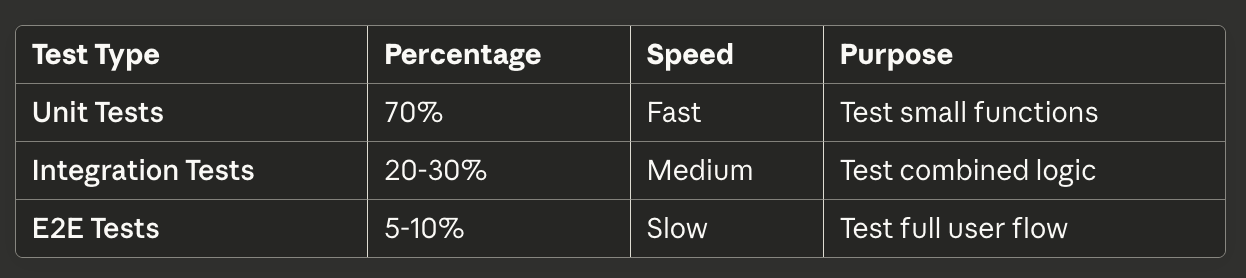
The majority of your tests should be fast unit tests that give immediate feedback. Use integration tests for critical workflows, and reserve E2E tests for the most important user journeys.
Test-Driven Development
TDD is a development methodology where you write tests before writing the actual code. This might seem backward at first, but it leads to better design and more reliable code.
Traditional development follows this pattern:
Write Code → Write Test → Run Test
TDD flips it:
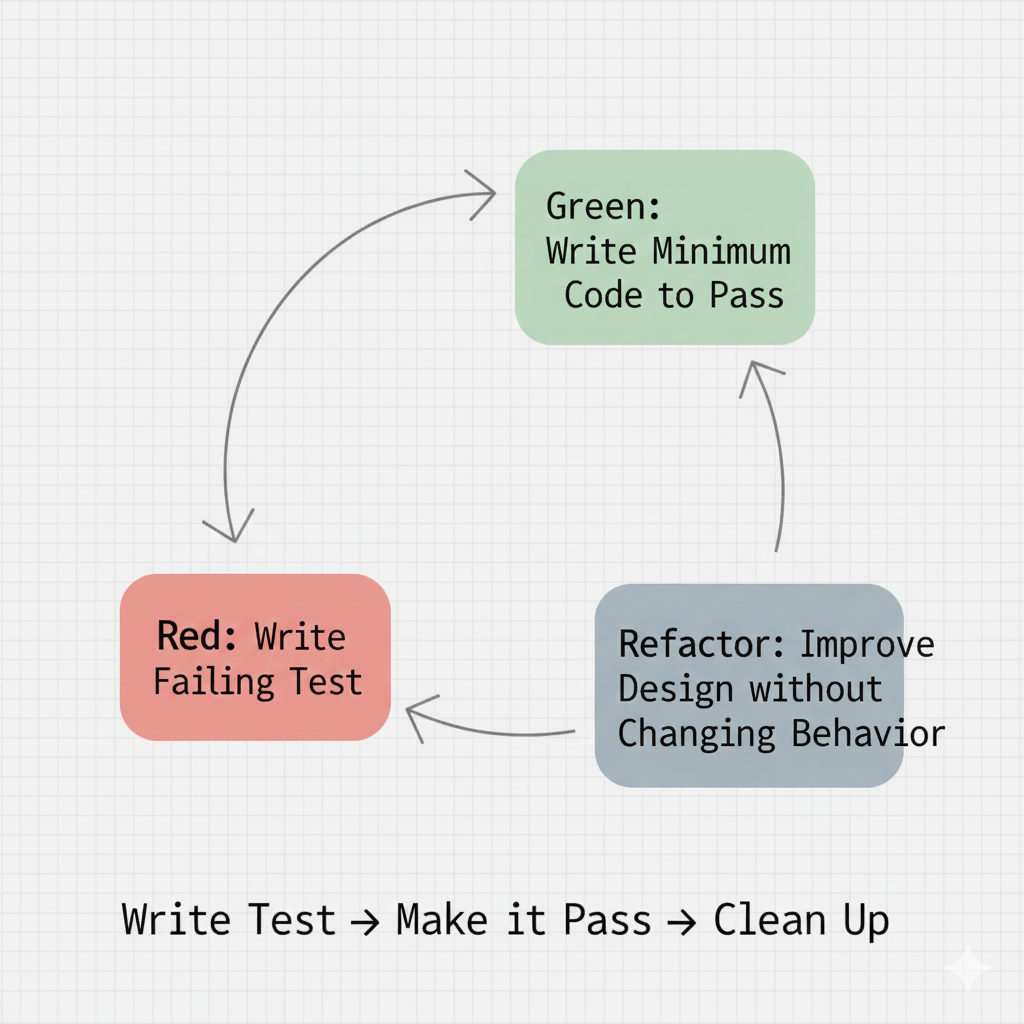
Write Test → Run Test (fail) → Write Code → Run Test (pass) → Refactor
This is known as the Red-Green-Refactor cycle.
The TDD Cycle Explained
Write a Test (Red)
First, predict how the function should behave and write a test for it. Run the test and watch it fail (turn red) because the code doesn't exist yet.
test("sum adds two numbers", () => {
  expect(sum(2, 3)).toBe(5); // This will fail because sum() doesn't exist
});
Write Minimum Code (Green)
Now write just enough code to make the test pass. Don't worry about optimization or perfection yet.
function sum(a, b) {
  return a + b; // Simple implementation that makes the test pass
}
Refactor
Once the test passes, improve the code quality. Clean up duplication, improve naming, optimize performance, but keep the tests passing.
// Maybe you realize you need type checking
function sum(a, b) {
  if (typeof a !== "number" || typeof b !== "number") {
    throw new Error("Arguments must be numbers");
  }
  return a + b;
}
Repeat
Do this for each requirement, edge case, and scenario. Write a test, make it pass, refactor, then move to the next test.
Why TDD Improves Design
When you write tests first, you're forced to think about your code from the consumer's perspective. You must consider:
- What are the expected inputs?
- What should the outputs be?
- What edge cases exist?
- How should errors be handled?
- What are the boundary conditions?
This leads to several benefits:
- Cleaner, more focused code
- Fewer edge-case bugs
- More predictable behavior
- Higher confidence when refactoring
- Better long-term maintainability
- Natural documentation through tests
By making a design plan before writing any logic, you create better APIs and avoid many common pitfalls.
Real-World TDD Example
Let's walk through a real example of TDD in action. We'll build a function that validates email addresses.
Step 1: Write the first test
test("validates a simple email", () => {
  expect(isValidEmail("test@example.com")).toBe(true);
});
Step 2: Make it pass
function isValidEmail(email) {
  return email.includes("@");
}
Step 3: Add a test for an edge case
test("rejects email without domain", () => {
  expect(isValidEmail("test@")).toBe(false);
});
Step 4: Update the code
function isValidEmail(email) {
  return email.includes("@") && email.split("@")[1].length > 0;
}
Step 5: Continue with more tests
Keep adding tests for different scenarios and improving the implementation until you have a robust, well-tested function.
Getting Started with Testing
If you're new to testing, here's how to start. For a practical look at how I wire TestGen into my Claude and Codex sessions to make test generation automatic, see that post.
Start small by testing pure functions that take input and return output without side effects. These are the easiest to test.
Choose a testing framework like Jest for JavaScript, pytest for Python, or JUnit for Java. These frameworks provide everything you need to write and run tests.
Aim for high coverage but focus on critical paths. Not all code needs the same level of testing. Prioritize business logic and complex algorithms.
Use CI/CD integration to run tests automatically on every push. Services like GitHub Actions make this easy to set up.
Practice TDD on small features to build the habit. It will feel slow at first, but you'll quickly become faster as you learn the patterns.
Conclusion
Automated testing is not optional in professional software development. With the right balance of unit, integration, and E2E tests, along with TDD practices, you can build applications that are reliable, maintainable, scalable, bug-resistant, and future-proof.
Whether you're building a small side project or a large production system, investing time in tests always pays off in the long run. Start small, practice consistently, and watch your code quality improve dramatically.
The key is to start today. Pick one function, write a test for it, and begin your journey toward better, more confident software development.